
Desglose de la jornada laboral infinita
Para liberar todo el potencial de la IA, debemos superar una barrera clave. Seguimiento del Índice de Tendencias Laborales 2025.
Publicado en: Worklab.
Ilustración de Ana Galvañ
En nuestro reciente Informe Anual del Índice de Tendencias Laborales 2025, trazamos el surgimiento de la Empresa Frontera, impulsada por la inteligencia disponible, dirigida por equipos de agentes humanos y definida por un nuevo rol para cada empleado, el jefe agente. Estas empresas rediseñan los procesos de negocio en torno a la IA y los agentes para escalar con rapidez, operar con agilidad y generar valor más rápido que las empresas tradicionales.
Pero las organizaciones nunca completarán su recorrido para convertirse en una empresa frontera concentrándose solo en el proceso. Nuestra investigación, basada en billones de señales de productividad de Microsoft 365 agregadas y anonimizadas a nivel mundial, revela un nuevo obstáculo desafiante: una jornada laboral en apariencia infinita.
La IA ofrece una forma de salir del fango, en especial si se combina con un ritmo de trabajo reinventado. De lo contrario, corremos el riesgo de utilizar la IA para acelerar un sistema roto. Para manejar esta barrera para la transformación, comencemos nuestra jornada laboral infinita.
Mañana: El día comienza antes que ustedes lo hacen
La jornada laboral a menudo comienza antes de que muchas personas se levanten de la cama. A las 6 de la mañana, muchos usuarios de Microsoft 365 escanean las bandejas de entrada desbordadas con la esperanza de adelantarse. Nuestros datos de telemetría muestran:
- El 40% de las personas que están en línea a las 6 a.m. revisan el correo electrónico para las prioridades del día.
- El trabajador promedio recibe 117 correos electrónicos al día, la mayoría de ellos hojeados en menos de 60 segundos.
- Los correos electrónicos masivos con 20+ destinatarios han aumentado un 7% en el último año, mientras que los hilos uno a uno están en declive (-5%).
La bandeja de entrada puede seguir como la puerta de entrada al trabajo, pero con demasiada frecuencia se abre a una avalancha de caos sin prioridad.
El caos de la jornada laboral infinita
Comienza temprano, en la mayoría de las veces en el correo electrónico, y muy rápido se convierte en una avalancha de mensajes, reuniones e interrupciones que agota la concentración.
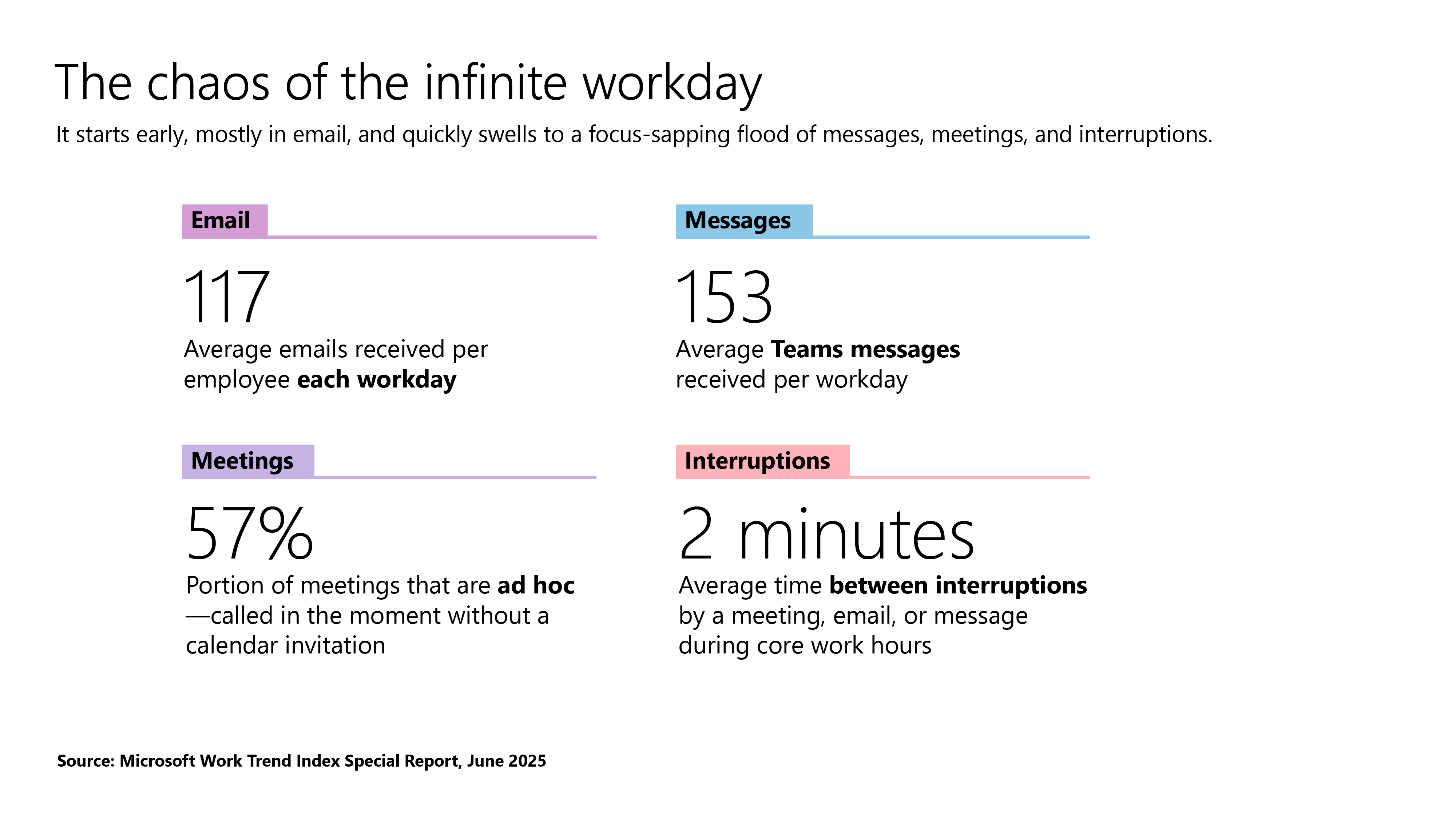
A las 8 de la mañana, Microsoft Teams supera al correo electrónico como canal de comunicación dominante, lo que acelera el día.
- El trabajador promedio recibe 153 mensajes de Teams por día laborable.
- Los mensajes por persona han aumentado un 6% interanual a nivel mundial: más del 20% en regiones como Europa Central y Oriental, Oriente Medio y África, y más del 15% en el Reino Unido y Corea del Sur.
Cada notificación por correo electrónico o mensaje puede parecer pequeña, pero juntas pueden establecer un ritmo frenético para el día siguiente.
Mediodía: El tiempo de concentración es un espejismo
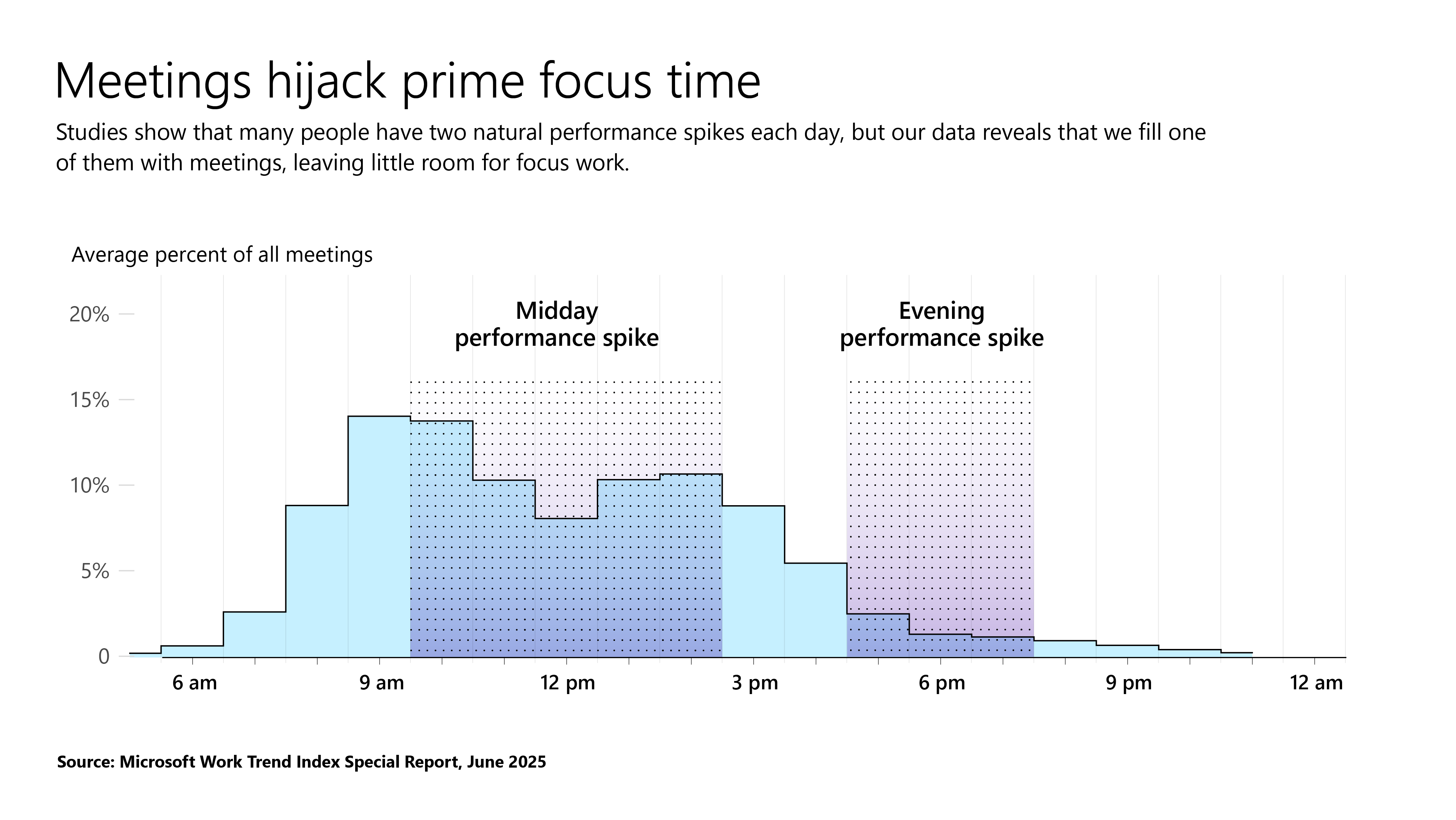
Las horas más valiosas de la jornada laboral a menudo se rigen por la agenda de otra persona. La mitad (50%) de todas las reuniones tienen lugar entre las 9 y las 11 a.m. y entre las 13 p.m., justo cuando, como muestran las investigaciones, muchas personas tienen un pico natural de productividad en su día, debido a sus ritmos circadianos. Pero nuestros datos revelan que llenamos este tiempo con reuniones, para dejar poco espacio para un enfoque profundo. Los martes ahora tienen la mayor carga de reuniones (23%), mientras que los viernes se reducen a solo el 16%. En lugar de un trabajo profundo, estas horas de máxima audiencia se pasan en recorrer un carrusel de llamadas.
Las reuniones secuestran el tiempo de concentración principal
Los estudios muestran que muchas personas tienen dos picos naturales de rendimiento cada día, pero nuestros datos revelan que llenamos uno de ellos con reuniones, lo que deja poco espacio para el trabajo de concentración.
Pero las reuniones no son la única fuerza que fractura la atención. A las 11 de la mañana, pico de productividad para muchos, la actividad de los mensajes también aumenta, con el 54% de los usuarios activos. Según nuestros datos de telemetría, es la hora más sobrecargada del día, ya que los mensajes en tiempo real, las reuniones programadas y el cambio constante de aplicaciones convergen, lo que hace que concentrarse en una sola tarea sea casi imposible.
Los calendarios pueden mostrar un descanso en las reuniones después del almuerzo, pero eso también podría ser un espejismo. Durante este tiempo, vemos un aumento en el uso de Word, Excel y PowerPoint (WXP) a medida que los empleados intentan concentrarse en el trabajo, como escribir, analizar datos y crear presentaciones, pero ese tiempo está fragmentado. Nuestros datos de telemetría muestran que, en promedio, los empleados que usan Microsoft 365 son interrumpidos cada 2 minutos por una reunión, un correo electrónico o una notificación. Ese ruido digital competitivo no aparece en los calendarios, pero como tal vez atestiguarán muchos trabajadores de la información, se siente a profunidad. De hecho, nuestra encuesta global del Índice de Tendencias Laborales muestra que casi la mitad de los empleados (48%) y más de la mitad de los líderes (52%) dicen que su trabajo se siente caótico y fragmentado.
El problema no es solo el volumen, es la expansión. Nuestros datos muestran que los modos de comunicación han comenzado a cambiar, la coordinación es más compleja y la carga mental es más pesada.
- El 57% de las reuniones son llamadas ad hoc sin una invitación en el calendario, y 1 de cada 10 reuniones programadas se reservan en el último minuto.
- Las reuniones grandes (65+ asistentes) son el tipo de más rápido crecimiento, tal vez como resultado de que los empleados naveguen por equipos cada vez más complejos y multifuncionales.
- Casi un tercio de las reuniones ahora abarcan múltiples zonas horarias, un 35% más que en 2021.
- Y en los últimos 10 minutos antes de una reunión, las ediciones de PowerPoint se disparan un 122%, el equivalente digital a estudiar antes de un examen.
Para muchos, la jornada laboral ahora se siente como navegar por el caos, al reaccionar a las prioridades de los demás y perder el enfoque en lo que más importa. En una época en la que cada hora cuenta, esa deriva podría agotar de manera silenciosa la energía y detener el progreso del negocio.
Noche: El triple pico aún no ha alcanzado su punto máximo
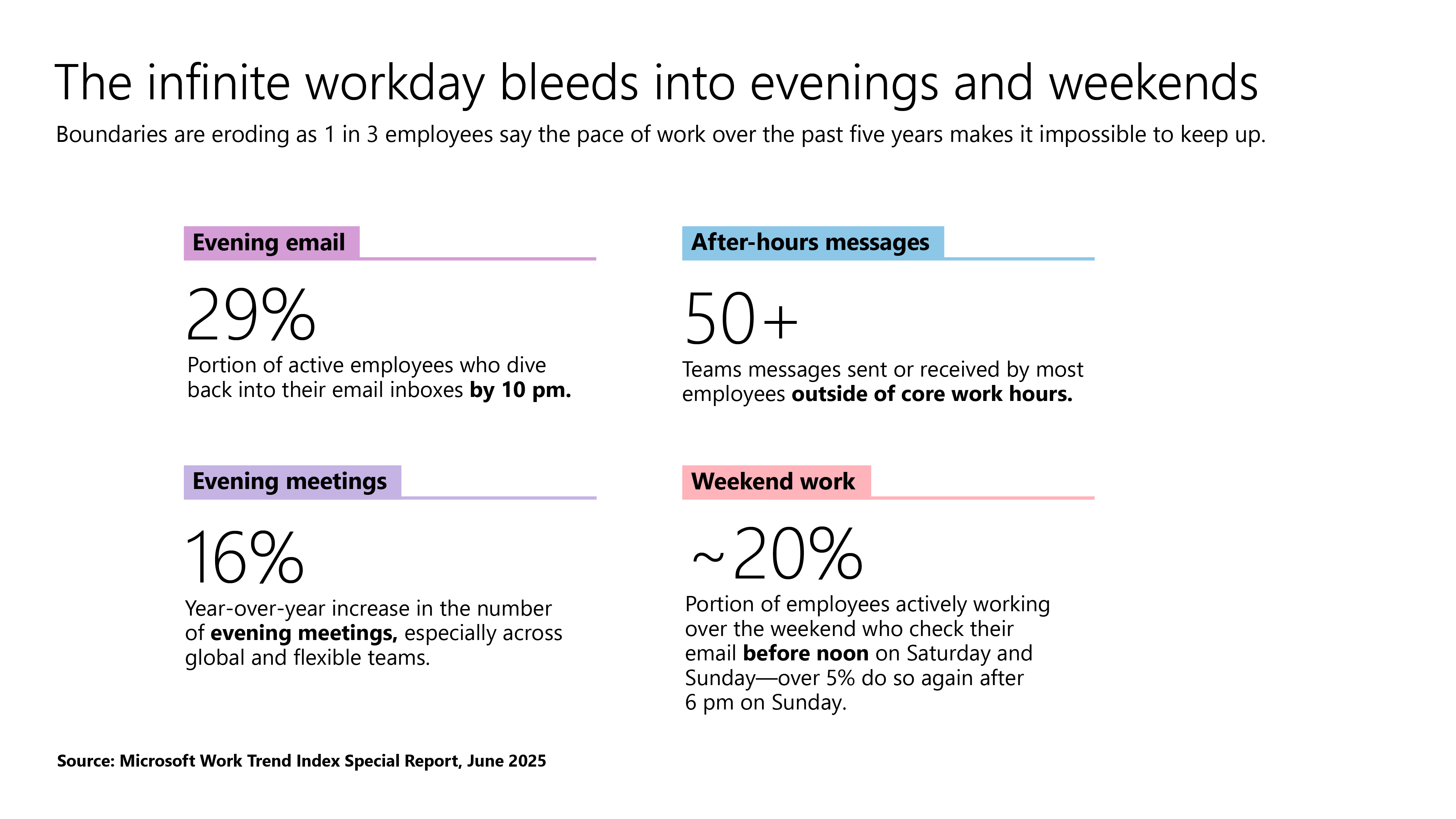
El cambio al día de triple pico que comenzó durante la pandemia ya no es una tendencia, para muchos, es la norma. La jornada laboral de hoy se extiende hasta bien entrada la noche. Nuestros datos de telemetría muestran que las reuniones después de las 8 p.m. han aumentado un 16% año tras año, y los equipos globales y flexibles representan gran parte del aumento. Y no se trata solo de reuniones: el empleado promedio ahora envía o recibe más de 50 mensajes fuera del horario comercial principal, y a las 10 p.m., casi un tercio (29%) de los trabajadores activos vuelven a sus bandejas de entrada, lo que apunta a un aumento constante en la actividad fuera del horario laboral.
Pero «trabajar hasta tarde» se puede experimentar de manera diferente. Un estudio reciente de Microsoft Research descubrió que los trabajadores remotos a menudo ven las horas nocturnas como una ventana productiva para ponerse al día de manera tranquila. Los trabajadores híbridos, por el contrario, tienen más probabilidades de experimentar ese mismo tiempo como una fuente de estrés. Para los gerentes y líderes, esto no es solo una nota a pie de página, es una señal que puede ayudar a establecer expectativas más claras, dar forma a la cultura del equipo y apoyar mejor a los equipos.
Y para algunos, esta presión se extiende al fin de semana, lo que hace que el domingo se sienta como un lunes más:
- Nuestros datos de telemetría muestran un aumento notable en el uso del correo electrónico durante los fines de semana. Casi el 20% de los empleados que trabajan de manera activa el fin de semana revisan su correo electrónico antes del mediodía del sábado y el domingo, despertándose para trabajar, incluso en los días libres típicos. Y más del 5% vuelve a enviar correos electrónicos los domingos por la noche (a partir de las 18:00 horas): los miedos de los domingos son reales y medibles.
- Y mientras que los patrones de correo electrónico imitan la semana laboral, otras aplicaciones cuentan una historia diferente: durante el fin de semana, el uso de WXP supera a los mensajes de Teams, ya que los empleados finalmente sacan tiempo para concentrarse en el trabajo ininterrumpido.
La jornada laboral infinita se desangra en las tardes y los fines de semana
Los límites se erosionan, ya que 1 de cada 3 empleados dice que el ritmo de trabajo de los últimos cinco años hace que sea imposible mantenerse al día.
Esto apunta a una verdad más grande: la jornada laboral moderna para muchos no tiene un comienzo o un final claros. A medida que las demandas empresariales se vuelven más complejas y las expectativas siguen en aumento, el tiempo que antes estaba reservado para concentrarse o recuperarse ahora puede dedicarse a ponerse al día, prepararse y buscar claridad. Es el equivalente profesional de tener que montar una bicicleta antes de cada salida. Se gasta demasiada energía en organizar el caos antes de que pueda comenzar un trabajo significativo.
Los líderes han comenzado a sentir la presión. Con presupuestos planos y una presión cada vez mayor para rendir, 1 de cada 3 empleados en nuestra encuesta global del Índice de Tendencias Laborales respondió que el ritmo de trabajo de los últimos cinco años ha hecho que sea imposible mantenerse al día. Las señales son claras: es hora de romper el ciclo. El futuro del trabajo no se definirá por la cantidad de trabajo pesado que automaticemos, sino por lo que elijamos reimaginar de manera fundamental. La IA puede darnos la ventaja para rediseñar el ritmo de trabajo, reenfocar a nuestros equipos en trabajos nuevos y diferenciadores, y arreglar lo que se ha convertido en una jornada laboral en apariencia infinita. La pregunta no es si el trabajo cambiará. Es si nosotros lo haremos.
El camino a seguir
Adoptar la IA no es suficiente. Lo que se necesita ahora es una mentalidad de Empresa Frontera, una que cuestione cómo se gasta el tiempo, cómo se realiza el trabajo y qué es lo que en verdad genera impacto. Aquí hay tres lugares para comenzar:
- Sigan la regla 80/20. En un mundo de presupuestos planos y atención cada vez menor, la actividad no es lo mismo que el progreso. Las organizaciones más eficaces lo saben y actúan en consecuencia. Las empresas frontera ponen en práctica el Principio de Pareto, centrándose en el 20% del trabajo que proporciona el 80% de los resultados. La IA hace que esto no solo sea posible, sino escalable. Al implementar la IA y los agentes para optimizar las tareas de bajo valor (reuniones de estado, informes de rutina, rotación de administradores), los líderes pueden recuperar tiempo para lo que mueve el negocio: trabajo profundo, decisiones rápidas y ejecución enfocada. Las empresas que puedan ganar en la era de la IA no solo trabajarán más duro, sino que trabajarán de forma más inteligente y aguda. ¿No saben por dónde empezar? Vean este discurso de liderazgo de la Conferencia de la comunidad de Microsoft 365 sobre Building the Future Firm.
- Rediseño para el diagrama de trabajo. Hoy en día, los equipos se organizan por funciones estáticas como finanzas, marketing e ingeniería. Pero con la experiencia disponible bajo demanda a través de la IA y los agentes, las estructuras rígidas añaden una fricción innecesaria. Tomemos como ejemplo el lanzamiento de un producto: el contenido está en el marketing, los datos en la analítica, el presupuesto en las finanzas y la mensajería en las comunicaciones. Una simple actualización, como un ajuste de precios, puede llevar días y varias reuniones. Es hora de pasar del organigrama al diagrama de trabajo, un modelo ágil y orientado a resultados en el que los equipos ajustados se forman en torno a un objetivo y utilizan la IA para llenar las brechas de habilidades y moverse rápido. En Supergood, una agencia que da prioridad a la IA y que antes se llamaba Supernatural, los empleados utilizan una plataforma impulsada por décadas de estrategia publicitaria para acceder a información al instante, sin necesidad de recurrir a un estratega en cada informe.
- Conviértanse en jefes de agentes. Hay una nueva generación de profesionales que se eleva a través del caos, no trabajan más, sino que trabajan de manera más inteligente. Los llamamos jefes de agentes. Tomemos como ejemplo a Alex Farach, un investigador de Microsoft que utiliza un trío de agentes para potenciar su trabajo: uno recopila nuevas investigaciones a diario, el siguiente realiza análisis estadísticos y el tercero redacta informes para ayudar a conectar los puntos. En lugar de quedarse atascado en el trabajo manual, Farach puede centrarse en lo que importa: información rápida y de alta calidad que beneficie a todo el equipo. Este es el futuro del trabajo: equipos de agentes humanos creados para adaptarse y escalar.
Metodología
Telemetría de Microsoft 365
Todos los datos se basan en señales de productividad de Microsoft 365 agregadas y anónimas, que finalizan el 15 de febrero de 2025. Los datos excluyen a los inquilinos de educación (EDU) y de la Unión Europea (UE).
- Interrupciones
Los empleados son interrumpidos cada dos minutos durante las horas de trabajo principales (275 veces al día) por reuniones, correos electrónicos o chats. Se calcula como una suma de pings (invitaciones a reuniones, correos electrónicos, chats) de 28 días consecutivos por usuario único por día laborable. La cifra de dos minutos refleja el tiempo promedio entre pings durante una jornada laboral de ocho horas. El 275 se basa en la jornada de 24 horas. Basado en el 20% superior de los usuarios por volumen de ping recibido. - Ediciones de PowerPoint de última hora
Las ediciones en PowerPoint aumentan un 122% en los últimos 10 minutos antes de una reunión. Se calcula como una suma móvil de 28 días de acciones de vista y edición de PowerPoint por participante de la reunión, medida en ventanas de tiempo fijas antes de las reuniones. - Reuniones ad hoc
El 60% de las reuniones son no programadas o ad hoc, sobre la base de un volumen continuo de 28 días de reuniones únicas por usuario y día laborable. Representa el 20% superior de los usuarios por volumen de reuniones. - Los chats fuera de horario
Los chats enviados fuera de la jornada laboral estándar de 9 a 5 han aumentado un 15% año tras año, con un promedio de 58 mensajes por usuario que ahora llegan antes o después del horario laboral. Se calcula como una suma móvil de 28 días de chats enviados fuera de lunes a viernes, de 9 a. m. a 5 p. m. - Las reuniones nocturnas y las reuniones de trabajo entre zonas horarias
Reuniones que comienzan después de las 8 p.m. han aumentado un 16% año tras año, impulsadas por un aumento en la colaboración entre zonas horarias. El 30% de las reuniones ahora abarcan múltiples zonas horarias, una cifra que ha aumentado 8 puntos porcentuales desde 2021. Medido como una suma móvil de 28 días de reuniones que comienzan entre las 8 p.m. y las 11:59 p.m., ajustado para la hora local de cada participante.
Encuesta del Índice de Tendencia Laboral
La encuesta del Índice de Tendencias Laborales fue realizada por una firma de investigación independiente, Edelman Data x Intelligence, entre 31 mil trabajadores del conocimiento empleados a tiempo completo o autónomos en 31 mercados entre el 6 de febrero de 2025 y el 24 de marzo de 2025. Esta encuesta duró 20 minutos y se realizó en línea, ya sea en inglés o traducida a los idiomas locales en todos los mercados. Se encuestó a mil trabajadores a tiempo completo en cada mercado, y los resultados globales se han agregado a todas las respuestas para proporcionar un promedio. En los Estados Unidos, se recogió una muestra adicional de 4.500 trabajadores del conocimiento empleados a tiempo completo o por cuenta propia en nueve subregiones/áreas metropolitanas.
Los mercados globales encuestados incluyen: Argentina, Australia, Brasil, Canadá, China, Colombia, República Checa, Finlandia, Francia, Alemania, Hong Kong, India, Indonesia, Italia, Japón, Malasia, México, Países Bajos, Nueva Zelanda, Filipinas, Polonia, Singapur, Corea del Sur, España, Suecia, Suiza, Taiwán, Tailandia, Reino Unido, Estados Unidos y Vietnam.
Las subregiones/áreas metropolitanas de los Estados Unidos encuestadas incluyen: Atlanta, Austin, Boston, DC Metro, Houston, Nueva York, Carolina del Norte, Pittsburgh y el Área de la Bahía de San Francisco.
Las audiencias mencionadas en el informe se definen de la siguiente manera:
- Trabajadores del conocimiento: Aquellos que suelen trabajar en un escritorio (ya sea en una oficina o en casa). Este grupo incluye a aquellos que están en persona o trabajan de forma remota en alguna capacidad.
- Líderes: Trabajadores del conocimiento en niveles de trabajo medios a altos (por ejemplo, vicepresidente sénior, vicepresidente, director sénior, gerente general, vicepresidente ejecutivo, alto nivel, presidente, etc.) que tienen al menos alguna influencia en la toma de decisiones relacionadas con la contratación, la elaboración de presupuestos, los beneficios de los empleados, las comunicaciones internas, las operaciones, etc.
- Empleados: Trabajadores del conocimiento que no están en niveles de trabajo medios a altos o que no tienen influencia en la toma de decisiones relacionadas con la contratación, la elaboración de presupuestos, los beneficios de los empleados, las comunicaciones internas, las operaciones, etc.
- Gerentes: Trabajadores del conocimiento que dirigen un equipo o grupo de empleados. Los gerentes pueden ser tomadores de decisiones de negocios o tomadores de decisiones no comerciales.
- Empresas frontera: Líderes que dicen que su empresa tiene una implementación de IA en toda la organización y creen que su organización es líder en la inversión activa en IA, y mide el retorno de la inversión en estas inversiones. Dicen que han visto cierto retorno de la inversión de la implementación de la IA y creen que es fundamental para su éxito a largo plazo como organización. Creen que los agentes serán clave para obtener un retorno de las inversiones en IA de su empresa. Estos líderes dicen que trabajan en organizaciones que en la actualidad utilizan agentes u otras herramientas de IA que aportan conjuntos de habilidades subcontratados a la empresa de manera previa, o utilizan sistemas multiagente que colaboran para lograr un objetivo o ejecutar flujos de trabajo complejos. Su empresa planea incorporar agentes de forma moderada o extensa a su estrategia de IA en los próximos 12 a 18 meses.
The post Desglose de la jornada laboral infinita appeared first on Source LATAM.
The post Desglose de la jornada laboral infinita appeared first on Source LATAM.