Amazon Kinesis Data Streams now allows customers to make API requests over Internet Protocol version 6 (IPv6) with dual-stack AWS PrivateLink interface Virtual Private Clouds (VPC) endpoints. This enhancement extends IPv6 compatibility, previously available only for public endpoints, to VPC endpoints across all AWS Regions. Dual-stack endpoints that have been validated under the Federal Information Processing Standard (FIPS) 140-3 program are also available.
Kinesis Data Streams allows users to capture, process, and store data streams in real time at any scale. Customers can now leverage IPv6 connectivity for data-streaming workloads within their Virtual Private Clouds (VPCs). IPv6 support is crucial for organizations facing IPv4 address exhaustion or those required to support IPv6 for compliance reasons. This feature allows for seamless integration of Kinesis Data Streams with IPv6-only networks, simplifying network management and reducing the need for complex IPv4 to IPv6 translations.
IPv6 support for VPC endpoints is now available in all AWS Regions, including commercial regions and AWS China regions operated by Sinnet and NWCD. See here for a full listing of our Regions and endpoints. To learn more about using Kinesis Data Streams with interface VPC endpoints, please refer to our Developer Guide. To learn more about AWS PrivateLink, see accessing AWS services through AWS PrivateLink.
Amazon Kinesis Data Streams now allows customers to make API requests over Internet Protocol version 6 (IPv6) with dual-stack AWS PrivateLink interface Virtual Private Clouds (VPC) endpoints. This enhancement extends IPv6 compatibility, previously available only for public endpoints, to VPC endpoints across all AWS Regions. Dual-stack endpoints that have been validated under the Federal Information Processing Standard (FIPS) 140-3 program are also available. Kinesis Data Streams allows users to capture, process, and store data streams in real time at any scale. Customers can now leverage IPv6 connectivity for data-streaming workloads within their Virtual Private Clouds (VPCs). IPv6 support is crucial for organizations facing IPv4 address exhaustion or those required to support IPv6 for compliance reasons. This feature allows for seamless integration of Kinesis Data Streams with IPv6-only networks, simplifying network management and reducing the need for complex IPv4 to IPv6 translations. IPv6 support for VPC endpoints is now available in all AWS Regions, including commercial regions and AWS China regions operated by Sinnet and NWCD. See here for a full listing of our Regions and endpoints. To learn more about using Kinesis Data Streams with interface VPC endpoints, please refer to our Developer Guide. To learn more about AWS PrivateLink, see accessing AWS services through AWS PrivateLink.
Starting today, you can launch Windows instances using EC2 Fast Launch, without requiring a launch template or a default VPC.
EC2 Fast Launch reduces the launch times of Windows instances using pre-provisioned snapshots. Previously, customers needed a launch template or a default VPC to enable EC2 Fast Launch for their Windows AMIs. With this update, you can enable EC2 Fast Launch with only the AMI ID.
The updated EC2 Fast Launch is now available through the AWS Console, CLI, and SDK in all AWS Commercial Regions and AWS GovCloud Regions. To get started with EC2 Fast Launch and to learn more about this new streamlined configuration, please visit the EC2 Fast Launch User Guide.
Starting today, you can launch Windows instances using EC2 Fast Launch, without requiring a launch template or a default VPC. EC2 Fast Launch reduces the launch times of Windows instances using pre-provisioned snapshots. Previously, customers needed a launch template or a default VPC to enable EC2 Fast Launch for their Windows AMIs. With this update, you can enable EC2 Fast Launch with only the AMI ID. The updated EC2 Fast Launch is now available through the AWS Console, CLI, and SDK in all AWS Commercial Regions and AWS GovCloud Regions. To get started with EC2 Fast Launch and to learn more about this new streamlined configuration, please visit the EC2 Fast Launch User Guide.
AWS Control Tower customers can now programmatically view statuses for their governed accounts via baseline APIs. The AWS Control Tower baseline contains best practice configurations, controls, and resources required for governance. When you enable this baseline on an organizational unit (OU), member accounts within the OU will be enrolled under governance.
With this new experience, you can use baseline status to view enrollment for your accounts and use drift status to identify when account and OU baseline configurations are out of sync. In addition to seeing statuses for your accounts and OUs in the AWS Control Tower console, you can the ListEnabledBaselines API to view statuses for your enabled baselines. To view statuses for individual accounts, use the “includeChildren” flag. You can filter by these statuses to view only the accounts and OUs which require your attention. These APIs include AWS CloudFormation support, allowing you to build automations to manage your OUs and accounts with infrastructure as code (IaC).
To learn more about these APIs, review Baselines and API References in the AWS Control Tower User Guide. Baseline APIs and the newly launched reporting capabilities are available in all AWS Regions where AWS Control Tower is available. For a list of AWS Regions where AWS Control Tower is available, see the AWS Region Table.
AWS Control Tower customers can now programmatically view statuses for their governed accounts via baseline APIs. The AWS Control Tower baseline contains best practice configurations, controls, and resources required for governance. When you enable this baseline on an organizational unit (OU), member accounts within the OU will be enrolled under governance. With this new experience, you can use baseline status to view enrollment for your accounts and use drift status to identify when account and OU baseline configurations are out of sync. In addition to seeing statuses for your accounts and OUs in the AWS Control Tower console, you can the ListEnabledBaselines API to view statuses for your enabled baselines. To view statuses for individual accounts, use the “includeChildren” flag. You can filter by these statuses to view only the accounts and OUs which require your attention. These APIs include AWS CloudFormation support, allowing you to build automations to manage your OUs and accounts with infrastructure as code (IaC). To learn more about these APIs, review Baselines and API References in the AWS Control Tower User Guide. Baseline APIs and the newly launched reporting capabilities are available in all AWS Regions where AWS Control Tower is available. For a list of AWS Regions where AWS Control Tower is available, see the AWS Region Table.
Starting today, Amazon Aurora MySQL – Compatible Edition 3 (with MySQL 8.0 compatibility) will support MySQL 8.0.40 through Aurora MySQL v3.09. In addition to several security enhancements and bug fixes, MySQL 8.0.40 contains enhancements that improve database availability when handling large number of tables and reduce InnoDB issues related to redo logging, and index handling.
Aurora MySQL 3.09 includes performance enhancements to improve write throughput for 32xl and larger instances running on I/O-Optimized configuration. This release also contains improvements that increase the cross-region resiliency of Aurora Global Database secondary region clusters. For more details, refer to the Aurora MySQL 3.09 and MySQL 8.0.40 release notes.
Amazon Aurora is designed for unparalleled high performance and availability at global scale with full MySQL and PostgreSQL compatibility. It provides built-in security, continuous backups, serverless compute, up to 15 read replicas, automated multi-Region replication, and integrations with other Amazon Web Services services. To get started with Amazon Aurora, take a look at our getting started page.
Starting today, Amazon Aurora MySQL – Compatible Edition 3 (with MySQL 8.0 compatibility) will support MySQL 8.0.40 through Aurora MySQL v3.09. In addition to several security enhancements and bug fixes, MySQL 8.0.40 contains enhancements that improve database availability when handling large number of tables and reduce InnoDB issues related to redo logging, and index handling. Aurora MySQL 3.09 includes performance enhancements to improve write throughput for 32xl and larger instances running on I/O-Optimized configuration. This release also contains improvements that increase the cross-region resiliency of Aurora Global Database secondary region clusters. For more details, refer to the Aurora MySQL 3.09 and MySQL 8.0.40 release notes. To upgrade to Aurora MySQL 3.09, you can initiate a minor version upgrade manually by modifying your DB cluster, or you can enable the “Auto minor version upgrade” option when creating or modifying a DB cluster. For upgrading a Global Database, you can refer to upgrading an Amazon Aurora global database guide. This release is available in all AWS regions where Aurora MySQL is available. Amazon Aurora is designed for unparalleled high performance and availability at global scale with full MySQL and PostgreSQL compatibility. It provides built-in security, continuous backups, serverless compute, up to 15 read replicas, automated multi-Region replication, and integrations with other Amazon Web Services services. To get started with Amazon Aurora, take a look at our getting started page.
Customers running Amazon Aurora and RDS for PostgreSQL, MySQL, and MariaDBdatabases can now purchase Reserved Instances for Graviton4-based R8g and M8g instances. These instances provide larger sizes up to 48xlarge with an 8:1 ratio of memory to vCPU and the latest DDR5 memory. Graviton4-based instances deliver up to 40% performance improvement and 29% better price-performance compared to equivalent Graviton3-based instances.
Reserved Instances offer significant savings over On-Demand rates with three flexible payment options: All Upfront providing the highest discount, Partial Upfront balancing between upfront and hourly payments, and No Upfront requiring no initial payment. Reserved Instances for 8th generation Graviton instances (R8g and M8g) offer deeper discounts as compared to the 7th generation Graviton instances (R7g and M7g), further improving the price-performance for these instances and enhancing cost-optimization opportunities. Reserved Instances provide instance size flexibility within the same family and automatically apply to both Single-AZ and Multi-AZ configurations, making them ideal for varying production workloads.
These 1-year Reserved Instances are available for Aurora MySQL, Aurora PostgreSQL, RDS for MySQL, RDS for PostgreSQL, and RDS for MariaDB in all AWS regions where Graviton4-based instances are offered with On-Demand pricing. For information on specific engine versions that support these DB instance types, refer to Aurora and RDS documentation.
To get started, purchase Reserved Instances through the AWS Management Console, AWS CLI, or AWS SDK. For detailed pricing information and purchase options, visit Aurora and RDS pricing pages. For additional questions related to Reserved Instances, refer to RDS FAQs.
Customers running Amazon Aurora and RDS for PostgreSQL, MySQL, and MariaDB databases can now purchase Reserved Instances for Graviton4-based R8g and M8g instances. These instances provide larger sizes up to 48xlarge with an 8:1 ratio of memory to vCPU and the latest DDR5 memory. Graviton4-based instances deliver up to 40% performance improvement and 29% better price-performance compared to equivalent Graviton3-based instances. Reserved Instances offer significant savings over On-Demand rates with three flexible payment options: All Upfront providing the highest discount, Partial Upfront balancing between upfront and hourly payments, and No Upfront requiring no initial payment. Reserved Instances for 8th generation Graviton instances (R8g and M8g) offer deeper discounts as compared to the 7th generation Graviton instances (R7g and M7g), further improving the price-performance for these instances and enhancing cost-optimization opportunities. Reserved Instances provide instance size flexibility within the same family and automatically apply to both Single-AZ and Multi-AZ configurations, making them ideal for varying production workloads. These 1-year Reserved Instances are available for Aurora MySQL, Aurora PostgreSQL, RDS for MySQL, RDS for PostgreSQL, and RDS for MariaDB in all AWS regions where Graviton4-based instances are offered with On-Demand pricing. For information on specific engine versions that support these DB instance types, refer to Aurora and RDS documentation. To get started, purchase Reserved Instances through the AWS Management Console, AWS CLI, or AWS SDK. For detailed pricing information and purchase options, visit Aurora and RDS pricing pages. For additional questions related to Reserved Instances, refer to RDS FAQs.
Customers running Amazon Aurora and RDS for PostgreSQL, MySQL, and MariaDBdatabases can now purchase Reserved Instances for R7i and M7i instances. These instances are powered by custom 4th Generation Intel Xeon Scalable processors and provide larger sizes up to 48xlarge with an 8:1 ratio of memory to vCPU and the latest DDR5 memory.
Reserved Instances offer significant savings over On-Demand rates with three flexible payment options: All Upfront providing the highest discount, Partial Upfront balancing between upfront and hourly payments, and No Upfront requiring no initial payment. Reserved Instances provide instance size flexibility within the same family and automatically apply to both Single-AZ and Multi-AZ configurations, making them ideal for varying production workloads.
These 1-year Reserved Instances are available for Aurora MySQL, Aurora PostgreSQL, RDS for MySQL, RDS for PostgreSQL, and RDS for MariaDB in all AWS regions where R7i and M7i instances are offered with On-Demand pricing. For information on specific engine versions that support these DB instance types, refer to Aurora and RDS documentation.
To get started, purchase Reserved Instances through the AWS Management Console, AWS CLI, or AWS SDK. For detailed pricing information and purchase options, visit Aurora and RDS pricing pages. For additional questions related to Reserved Instances, refer to RDS FAQs.
Customers running Amazon Aurora and RDS for PostgreSQL, MySQL, and MariaDB databases can now purchase Reserved Instances for R7i and M7i instances. These instances are powered by custom 4th Generation Intel Xeon Scalable processors and provide larger sizes up to 48xlarge with an 8:1 ratio of memory to vCPU and the latest DDR5 memory. Reserved Instances offer significant savings over On-Demand rates with three flexible payment options: All Upfront providing the highest discount, Partial Upfront balancing between upfront and hourly payments, and No Upfront requiring no initial payment. Reserved Instances provide instance size flexibility within the same family and automatically apply to both Single-AZ and Multi-AZ configurations, making them ideal for varying production workloads. These 1-year Reserved Instances are available for Aurora MySQL, Aurora PostgreSQL, RDS for MySQL, RDS for PostgreSQL, and RDS for MariaDB in all AWS regions where R7i and M7i instances are offered with On-Demand pricing. For information on specific engine versions that support these DB instance types, refer to Aurora and RDS documentation. To get started, purchase Reserved Instances through the AWS Management Console, AWS CLI, or AWS SDK. For detailed pricing information and purchase options, visit Aurora and RDS pricing pages. For additional questions related to Reserved Instances, refer to RDS FAQs.
Cómo Microsoft y Cloudforce ayudan a las instituciones educativas a innovar con Azure AI
Por: Equipo de Microsoft Educación.
Muchos líderes de la educación superior están ansiosos por aprovechar el vasto potencial de la IA. De hecho, el 89% de las instituciones participan en la planificación estratégica de la IA de alguna manera.1 Su objetivo es mejorar los resultados de los estudiantes con un aprendizaje personalizado, agilizar las tareas administrativas del profesorado y el personal con agentes impulsados por IA y aprovechar las innumerables otras formas en que la IA generativa puede ayudarles a innovar. Las principales instituciones ya han comenzado a implementar plataformas de IA en la educación superior.
Microsoft y nuestra red de socios pueden ayudarlos a avanzar con la IA. A diferencia de muchas herramientas de IA disponibles a nivel público, una solución creada por un socio de Microsoft con Microsoft Azure OpenAI Service mantiene la privacidad de sus interacciones de IA, lo que le permite mantener el control de la información de su institución. También es más fácil mantener el cumplimiento de las leyes de privacidad de datos, como la Ley de Derechos Educativos y Privacidad de la Familia (FERPA, por sus siglas en inglés), el Reglamento General de Protección de Datos (GDPR, por sus siglas en inglés) y la Ley de Portabilidad y Responsabilidad de Seguros Médicos (HIPAA, por sus siglas en inglés).
El compromiso de Microsoft con la IA Confiable significa que la IA es segura, protegida y privada. Los estudiantes, profesores e investigadores también pueden seleccionar entre una amplia gama de modelos líderes, con opciones populares de creadores como OpenAI, Meta, DeepSeek y más, para encontrar el que mejor se adapte a sus casos de uso.
En una hoja de datos sobre la aceleración de la innovación en IA, destacamos cómo nuestro socio Cloudforce ha desarrollado la solución nebulaONE®, impulsada por Azure OpenAI Service, para simplificar el acceso a las capacidades de IA generativa más avanzadas de Microsoft. Exploremos cómo empodera a las instituciones para lograr más.
Cómo nebulaONE by Cloudforce pretende llevar la IA segura a todos
Muchos estudiantes y profesores ya utilizan la IA generativa. Pero a medida que adoptan sus propias herramientas de IA no seguras, se crean preocupaciones con la gobernanza, la seguridad, la privacidad y la protección de datos de TI, y se limita la capacidad de escalar la IA en toda la institución. Cloudforce, proveedor del año de Microsoft en 2024, tiene experiencia en la creación de soluciones de IA para abordar esas preocupaciones, así como más de una década de experiencia en el diseño y la implementación de infraestructuras complejas y aplicaciones nativas de la nube de manera exclusiva en Azure. Cloudforce creó nebulaONE en Azure para utilizar sus funciones integradas de seguridad y privacidad, y la empresa está comprometida con docenas de instituciones de educación superior para cumplir su misión de proporcionar acceso seguro a la IA para todos.
nebulaONE, una puerta de enlace de IA generativa conversacional, permite a los estudiantes, profesores, investigadores y personal aprovechar los modelos de IA de vanguardia para reimaginar las experiencias de aprendizaje, acelerar la investigación, proteger la propiedad intelectual e impulsar la eficiencia institucional en todos los departamentos. Incluye una interfaz de chat intuitiva y multimodal para las interacciones de IA que son familiares para muchos, y proporciona la capacidad de desarrollar agentes de IA de bajo código y tareas específicas para impulsar la innovación y la eficiencia en todo el campus. La plataforma nebulaONE se implementa en su entorno de Azure, por lo que sus datos permanecen privados y obtiene las protecciones de cumplimiento y seguridad integradas en los servicios de IA de Azure.
«Sabemos que los líderes de la educación superior se enfrentan a la presión de preparar a la fuerza laboral del mañana para tener éxito con la IA, o corren el riesgo de quedarse atrás», dice el CEO de Cloudforce, Husein Sharaf. «Creamos nebulaONE para abordar las necesidades más apremiantes de educadores y estudiantes, con un proceso de implementación rápido que permite de manera segura el uso de IA generativa a escala. Nuestra capa de gestión en todo el campus mantiene a las instituciones en el asiento del conductor desde una perspectiva de costos y gobernanza, mientras que una interfaz de usuario simple y personalizada impulsa la adopción por parte de los usuarios. Nuestra plataforma proporciona la base para una estrategia de IA flexible que evoluciona a medida que surgen nuevos modelos y capacidades».
Cloudforce apoya a los líderes institucionales dondequiera que se encuentren en su recorrido, ya sea si exploran la IA por primera vez o conectan una plataforma de IA a todo su patrimonio de datos. El equipo de Cloudforce puede organizar talleres para ayudar a identificar casos de uso tempranos o proporcionar capacitaciones y maratones para reforzar las mejores prácticas y enseñarle a ustedes y a sus colegas cómo desarrollar sus propios agentes. También ofrecen asistencia con la gestión del cambio y las comunicaciones estratégicas para impulsar la adopción de nebulaONE en todo el campus y los usos que proporcionan el mayor valor para su institución.
El impacto de la IA generativa en la educación superior en el mundo real
Una historia de éxito proviene de la Universidad de California, Los Ángeles, John E. Anderson Graduate School of Management (UCLA Anderson). A los líderes de UCLA Anderson les preocupaba el uso de plataformas públicas de IA, por lo que buscaron un socio que pudiera ofrecer una experiencia segura y privada que permitiera sus casos de uso prioritarios. Eligieron adoptar nebulaONE porque es una plataforma administrada por completo, que se implementa en su entorno Azure y, en alrededor de dos meses, lanzaron un chatbot de IA generativa para apoyar a los estudiantes de MBA con su proyecto final.
Los líderes de UCLA Anderson buscaron desarrollar e implementar una gran cantidad de chatbots impulsados por IA para una variedad de propósitos específicos, y Cloudforce validó casos de uso y brindó capacitación práctica para capacitar al personal de UCLA para construirlos de forma independiente con nebulaONE. La escuela ahora ha desplegado bots para ayudar a los estudiantes a registrarse en las clases y proporcionar comentarios sobre los ensayos, así como un próximo agente impulsado por IA que reducirá las tareas administrativas de los entrenadores profesionales para que puedan pasar más tiempo con los 40 mil ex alumnos de la escuela. Varios meses después de que UCLA implementara la plataforma, las tasas mensuales de usuarios activos continuaron su aumento de manera rápida, con un crecimiento de un 485% de diciembre de 2024 a enero de 2025.
UCLA no está sola. Un número cada vez mayor de colegios y universidades han comenzado a implementar nebulaONE para aprovechar el poder de la IA:
Universidad Estatal de California, Fullerton (Universidad Estatal de California en Fullerton) ahora proporciona una IA segura y gestionada por la universidad para todos los estudiantes a través de TitanGPT, como se conoce a la plataforma de marca personalizada. También han comenzado a explorar casos de uso para soluciones de soporte, como un agente para optimizar el soporte de HelpDesk y su sistema de tickets de TI.
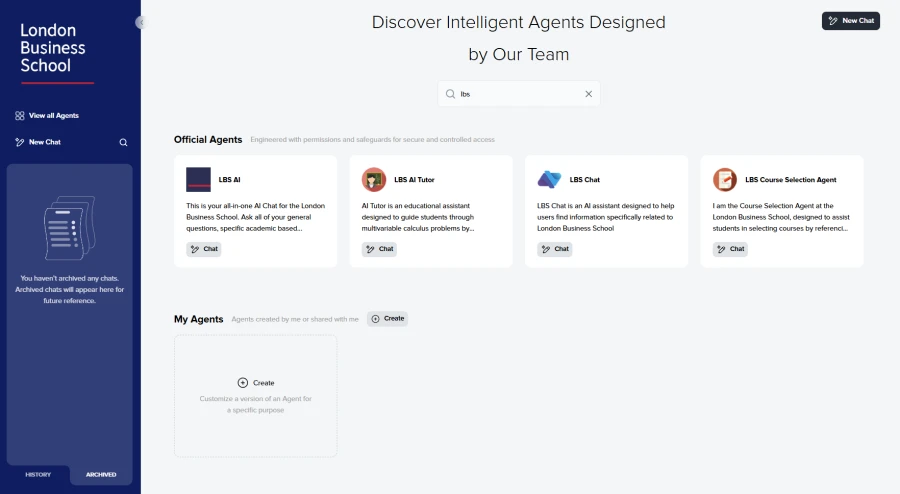
La London Business School buscó encontrar una solución de IA rentable y escalable, con acceso a una variedad de modelos básicos de IA. Después de una breve demostración, rápido comenzaron una implementación completa para los 6 mil estudiantes, profesores e investigadores, los primeros en el Reino Unido en hacerlo.
TerpAI, el chatbot construido en la plataforma nebulaONE de la Universidad de Maryland, actúa como asistente digital y recurso educativo para ayudar a los profesores y estudiantes a generar ideas, analizar datos, crear guías de estudio, desarrollar planes de lecciones y más.
La plataforma recibe el nombre de CWRU AI en la Universidad Case Western Reserve (CWRU, por sus siglas en inglés), donde la comunidad de CRWU puede seleccionar entre modelos de IA como ChatGPT 4o o 3.5 Turbo de OpenAI, Llama 3.2 de Meta y DeepSeek R1. CWRU AI utiliza el razonamiento de IA para analizar imágenes, archivos PDF, Word y Excel, y la comunidad puede implementar chatbots conectados a fuentes de datos específicas para departamentos o grupos.
Conozcan más sobre lo que es posible con la IA
Estos ejemplos ponen de manifiesto cómo los líderes de la educación superior pueden implementar de forma rápida y segura la IA generativa para mejorar los servicios a los estudiantes, las ofertas académicas y la eficiencia operativa. ¿Están listos para implementar la IA en su escuela? Descubran cómo nebulaONE puede hacer que la IA sea accesible al descargar la hoja de datos de Microsoft y Cloudforce.
Descubran el centro de aprendizaje de IA, que incluye documentación para adoptar la IA y capacitaciones para mejorar las habilidades de IA para una variedad de roles.
1 Jenay Robert. Estudio del panorama de la IA de EDUCAUSE 2024. Informe de investigación. Boulder, CO, EE. UU.: EDUCAUSE, febrero de 2024.
Amazon Elastic Container Service (Amazon ECS) today added support for Amazon EBS Provisioned Rate for Volume Initialization. This feature helps you provision and attach fully performant Amazon EBS volumes from Amazon EBS Snapshots to your Amazon ECS tasks, accelerating initialization for your ETL jobs, media transcoding, and ML inference workloads deployed on Amazon ECS.
Amazon ECS allows you to use Amazon EBS volumes for your ECS tasks and services deployed on both AWS Fargate and Amazon Elastic Compute Cloud (EC2) instances by simply passing desired EBS volume attributes (e.g. size, type, IOPS, throughput). You could already initialize EBS volumes attached to your ECS tasks from an existing EBS snapshot by configuring the snapshot-id and with today’s release you can ensure that these attached volumes will be fully performant within a predictable amount of time by specifying a volume initialization rate for these volumes. For ECS services, ECS applies the same rate to volumes for all tasks in the service.
This feature is available in all AWS commercial Regions through the AWS Console, AWS Command Line Interface (CLI), AWS SDKs, and AWS CloudFormation. For pricing information, please visit the EBS pricing page. To learn more, please refer to our documentation.
Amazon Elastic Container Service (Amazon ECS) today added support for Amazon EBS Provisioned Rate for Volume Initialization. This feature helps you provision and attach fully performant Amazon EBS volumes from Amazon EBS Snapshots to your Amazon ECS tasks, accelerating initialization for your ETL jobs, media transcoding, and ML inference workloads deployed on Amazon ECS. Amazon ECS allows you to use Amazon EBS volumes for your ECS tasks and services deployed on both AWS Fargate and Amazon Elastic Compute Cloud (EC2) instances by simply passing desired EBS volume attributes (e.g. size, type, IOPS, throughput). You could already initialize EBS volumes attached to your ECS tasks from an existing EBS snapshot by configuring the snapshot-id and with today’s release you can ensure that these attached volumes will be fully performant within a predictable amount of time by specifying a volume initialization rate for these volumes. For ECS services, ECS applies the same rate to volumes for all tasks in the service. This feature is available in all AWS commercial Regions through the AWS Console, AWS Command Line Interface (CLI), AWS SDKs, and AWS CloudFormation. For pricing information, please visit the EBS pricing page. To learn more, please refer to our documentation.
Today, AWS announces the opening of a new AWS Data Transfer Terminal location within CoreSite SV8 in Santa Clara, California, marking the second location in California alongside existing locations in Los Angeles and New York City. AWS Data Transfer Terminal is a secure, physical location where you can bring your storage devices and upload data to AWS to AWS including Amazon Simple Storage Service (Amazon S3), Amazon Elastic File System (Amazon EFS), and others using a high throughput network connection.
Data Transfer Terminals are ideal for customers who need to transfer large amounts of data to the AWS quickly and securely. Common use cases span various industries and applications, including video production data for processing in the media and entertainment industry, training data for Advanced Driver Assistance Systems (ADAS) in the automotive industry, migrating legacy data in the financial services industry, and uploading equipment sensor data in the industrial and agricultural sectors. Once uploaded, you can immediately leverage AWS services like Amazon Athena for analysis, Amazon SageMaker for machine learning, or Amazon Elastic Compute Cloud (Amazon EC2) for application development – reducing data processing time from weeks to minutes.
To learn more, visit the Data Transfer Terminal product page and documentation. To get started, make a reservation at your nearby Data Transfer Terminal in the AWS Console.
Today, AWS announces the opening of a new AWS Data Transfer Terminal location within CoreSite SV8 in Santa Clara, California, marking the second location in California alongside existing locations in Los Angeles and New York City. AWS Data Transfer Terminal is a secure, physical location where you can bring your storage devices and upload data to AWS to AWS including Amazon Simple Storage Service (Amazon S3), Amazon Elastic File System (Amazon EFS), and others using a high throughput network connection. Data Transfer Terminals are ideal for customers who need to transfer large amounts of data to the AWS quickly and securely. Common use cases span various industries and applications, including video production data for processing in the media and entertainment industry, training data for Advanced Driver Assistance Systems (ADAS) in the automotive industry, migrating legacy data in the financial services industry, and uploading equipment sensor data in the industrial and agricultural sectors. Once uploaded, you can immediately leverage AWS services like Amazon Athena for analysis, Amazon SageMaker for machine learning, or Amazon Elastic Compute Cloud (Amazon EC2) for application development – reducing data processing time from weeks to minutes. To learn more, visit the Data Transfer Terminal product page and documentation. To get started, make a reservation at your nearby Data Transfer Terminal in the AWS Console.
AWS Deadline Cloud now supports specifying a configuration script on both Linux and Windows service-managed fleets. The provided configuration script will be run with elevated privileges on each worker. AWS Deadline Cloud is a fully managed service that simplifies render management for teams creating computer-generated graphics and visual effects, for films, television and broadcasting, web content, and design.
Configuration scripts make it easy to install additional software, like plugins and dependencies, on a worker in a service-managed fleet as part of customizing the job environment. Configuration scripts can also be used to install telemetry collectors for monitoring, and tools like Docker for running containers on service-managed fleets.
Configuration scripts for service-managed fleets are available in all AWS Regions where Deadline Cloud is available.
AWS Deadline Cloud now supports specifying a configuration script on both Linux and Windows service-managed fleets. The provided configuration script will be run with elevated privileges on each worker. AWS Deadline Cloud is a fully managed service that simplifies render management for teams creating computer-generated graphics and visual effects, for films, television and broadcasting, web content, and design. Configuration scripts make it easy to install additional software, like plugins and dependencies, on a worker in a service-managed fleet as part of customizing the job environment. Configuration scripts can also be used to install telemetry collectors for monitoring, and tools like Docker for running containers on service-managed fleets. Configuration scripts for service-managed fleets are available in all AWS Regions where Deadline Cloud is available. To learn more about configuration scripts, visit the AWS Deadline Cloud documentation.